Jennifer Script Font: Elegant Typography for Digital Experiences
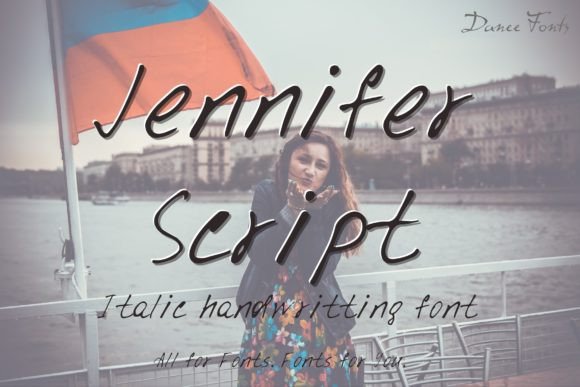
As a web designer, the choice of typography is one of the most foundational decisions I make for a project. It sets the tone before a user reads a single word and establishes a visual rhythm that guides the entire experience. When a font like Jennifer Script enters my toolkit, it brings a specific, powerful character to the screen. Jennifer Script is a hand-drawn script typeface that balances charm with a refined elegance. Its flowing strokes and organic letterforms evoke a sense of crafted personal touch, a quality often lost in purely geometric digital interfaces.
The Visual Character of Jennifer Script
Jennifer Script possesses a distinct personality. It is not overly casual or whimsical; its elegance lends it a professional poise. The letters connect with a natural, readable flow, avoiding the overly tight ligatures that can hinder legibility on screens. This makes it a practical display font rather than a purely decorative one. Its visual appeal is digital-native—it looks crisp on retina displays and maintains its character when scaled. For web and UI designers, this means we can employ its charm without sacrificing technical clarity.
Applications in Modern Web Design
The true test of a font is how it performs in real layouts. Jennifer Script finds its strength in specific, impactful roles across digital products.
Hero Sections & Landing Page Headlines
In a hero section, the primary goal is immediate emotional connection and brand statement. Jennifer Script, used for the main headline, can instantly convey warmth, creativity, and premium quality. For a creative portfolio, a coaching or wellness website, or a boutique e-commerce store, this first impression builds trust and aligns the user with the brand’s tone. Its elegance suggests care and attention to detail.
Call-to-Action Accents & Button Text
While not typically used for full button labels due to readability constraints at small sizes, Jennifer Script can be exceptionally effective for short, powerful CTA phrases within a button design or as a decorative accent near a primary button. A phrase like “Get Started” or “Download Now” in this script can make the action feel more personalized and inviting, potentially enhancing conversion in thoughtfully designed layouts.
Brand Identity & Logographic Elements
For branding within websites, Jennifer Script is a compelling choice for logotype text, especially for businesses wanting a human, artisan feel. It can be integrated into the site’s header logo and then echoed in other branded elements like email signature graphics, social media banners, and digital certificate designs. This consistency strengthens the online identity across touchpoints.
Decorative Headings & Quote Graphics
Within long-form content, such as a blog or course sales page, using Jennifer Script for pull quotes, section headers, or chapter titles breaks the typographic monotony and draws the eye. It adds a layer of editorial design sophistication, making the content feel more curated and valuable.
Readability and Technical Implementation
Any script font demands careful implementation to ensure it remains an asset, not a hindrance, to usability.
For mobile screens and responsive layouts, use Jennifer Script at sufficiently large sizes. As a rule, script typefaces require more space to remain legible. Avoid using it for any body text or critical information in small, condensed spaces. On dark backgrounds or image overlays, ensure ample contrast is provided; its thin strokes can disappear on busy or low-contrast backgrounds.
A key technical consideration is its availability as a webfont. Before integration, confirm that the license includes web use and that the font files are provided in standard webfont formats (WOFF, WOFF2). This ensures consistent rendering across all browsers and devices. Also, check for multilingual support and alternate characters, which can provide useful variations for logo design.
Building a Cohesive Typographic System
Jennifer Script is a display font. Its role is to attract attention and set a tone. To build a readable, scannable layout, it must be paired with a robust supporting typeface for all body copy and UI elements.
- Pair with a Neutral Sans Serif: A clean, versatile sans serif like Inter, Open Sans, or system fonts like SF Pro creates a perfect balance. The sans serif handles all paragraphs, form labels, and navigation text, providing a stable foundation that lets the script shine selectively.
- Pair with a Complementary Serif: For a more editorial, luxury, or academic digital identity, pairing Jennifer Script with a sophisticated serif font for body text (e.g., Playfair Display, Lora) can create a rich, layered typography palette.
This pairing establishes a clear visual hierarchy. The script becomes the visual peak for key moments, while the paired font ensures continuous readability, guiding scanning behavior and supporting user engagement.
Licensing for Digital Projects
When using a premium font like Jennifer Script in commercial web projects, understanding the license is non-negotiable. Most licenses for such fonts cover use in client website projects, online storefronts, and digital product interfaces. However, if you are creating a digital template or product (like a website theme or an app UI kit) that will be resold, you often need an extended license. Always verify that the license explicitly permits embedding on public websites and in the number of projects you intend to use it for. This protects your work and your client’s brand assets.
Integrating into a Digital Brand Kit
For designers building comprehensive brand identities, Jennifer Script can be a cornerstone of the digital brand kit. Define its specific use cases: “For primary hero headlines on the homepage,” “For the logotype in the header,” “For special offer banners.” Providing these clear rules to clients or within your team ensures the font is used consistently and effectively, maintaining a professional and coherent online presence across all pages, ads, and graphics.
Ultimately, Jennifer Script is a tool for emotional resonance. In a digital landscape often dominated by stark minimalism, it offers a way to inject humanity and crafted elegance. By applying it strategically—respecting its technical requirements, pairing it wisely, and adhering to proper licensing—web designers can create digital experiences that are not only functional but also distinctly memorable and brand-aligned.